Analyseur de parties Chess.com
Cette extension permet d'analyser les parties directement sur Chess.com grâce à stockfish 17 lite et à mon algorithme de classification de coups.

Pour des raisons juridiques, je ne peux pas publier ni mettre en open source le code source de cette extension. Le projet reste toutefois documenté ici (captures d’écran, explications techniques et démonstrations), mais le code et les releases resteront privés.
Quand je me suis remis aux échecs, je suis rapidement devenu addict à l'outil d’analyse proposé par chess.com. Il permet d’obtenir des évaluations précises des coups joués, de visualiser les meilleurs mouvements, et de progresser efficacement. Mais ce service est payant : il faut débourser environ 17 € par mois pour y avoir accès.

Plutôt que de m’abonner, je me suis lancé un défi personnel : recréer ces fonctionnalités moi-même, en développant une extension Chrome open source, capable d’analyser les parties en temps réel grâce à Stockfish, et d’offrir une visualisation élégante directement intégrée à l’interface de chess.com.
Ce projet a rapidement pris une ampleur que je n’aurais pas imaginée au départ. Il est finalement devenu mon premier vrai projet complet réalisé en TypeScript. C’est aussi un excellent terrain d’expérimentation technique, notamment autour de la communication avec un moteur UCI comme Stockfish et du développement d’algorithmes d’analyse de parties d’échecs personnalisés.
Tech & stack
Ce projet est une extension Chrome/Firefox que j’ai développé en TypeScript avec Vite pour le packaging: une stack moderne, rapide à recharger, très agréable pour le développement d’extensions web.
Elle embarque une version allégée du moteur Stockfish 17 (Lite), directement dans le navigateur, permettant de faire tourner des évaluations en local, sans dépendre d’une API externe.
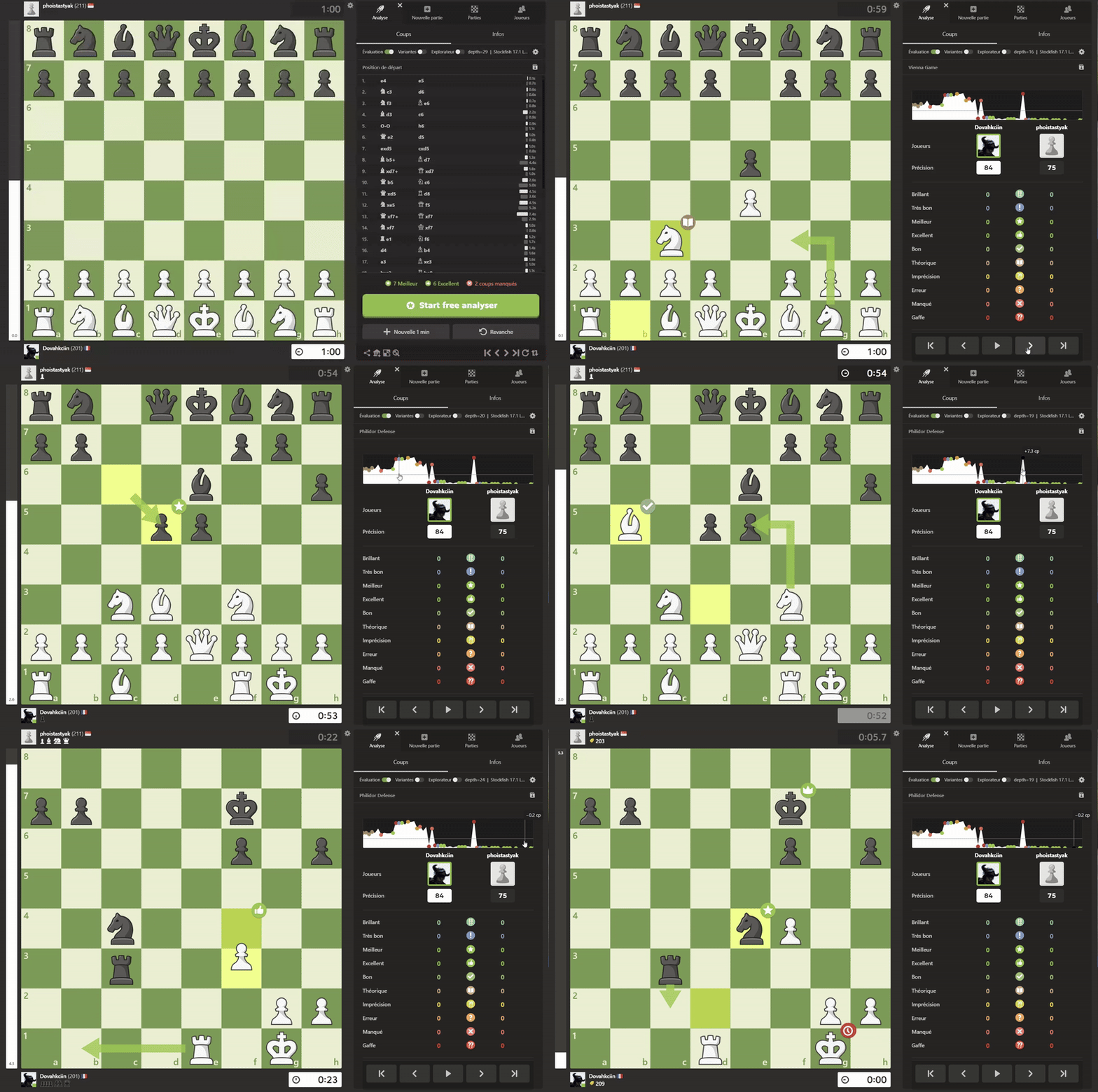
Explication du fonctionnement de l'extension
L’extension détecte automatiquement les coups joués sur une partie en temps réel sur Chess.com, en s’intégrant directement à l’interface web du site. Elle observe l’évolution de la position échiquier au fil des coups, puis interroge Stockfish localement pour en extraire une évaluation précise.
Récupération de l’état de l’échiquier
À chaque coup joué, l’extension intercepte le FEN (Forsyth-Edwards Notation) directement depuis le DOM de chess.com. Cette chaîne encode la disposition des pièces, le trait (si c'est aux blancs ou noirs de jouer), les droits de roque, les prises en passant, etc.
r1bqkbnr/pppp1ppp/2n5/4p3/2B1P3/5N2/PPPP1PPP/RNBQK2R w KQkq - 2 4
À partir de ce FEN, l’extension utilise une interface JavaScript pour envoyer la position à Stockfish via un processus Web Worker exécutant le moteur en local (grâce à la version WebAssembly de Stockfish, stockfish.js).
Analyse par Stockfish
Stockfish reçoit le FEN et génère une évaluation positionnelle. L’extension exécute les commandes suivantes :
worker.postMessage("uci");
worker.postMessage("position fen <FEN>");
worker.postMessage("eval");
La commande eval retourne une sortie textuelle structurée, que l’extension analyse ligne par ligne. Par exemple :
Classical evaluation   -0.08 (white side)
Final evaluation       -0.08 (white side)
Détection des meilleurs coups
L’extension interroge ensuite Stockfish pour obtenir les meilleurs coups à jouer depuis la position courante :
worker.postMessage("go depth 16");
Elle récupère alors les lignes de recherche principale (PV) du moteur :
info depth 15 score cp -8 pv e2e4 e7e5 g1f3 ...
Chaque coup est évalué en centipions (1/100e de pion), ce qui est ensuite converti en pourcentage de victoire estimé à l’aide d’une fonction logistique classique :
winrate = 100 / (1 + Math.exp(-eval * 0.004));
Elle peut ainsi comparer le winrate avant et après le coup du joueur, pour identifier les erreurs, imprécisions ou coups parfaits.
Mon algorithme de classification des coups
Une des particularités notables de l’extension, c’est qu’elle ne s’appuie sur aucune bibliothèque externe pour classer les coups joués (Meilleur coup, coup Brillant, Erreur, etc.). J’ai conçu un algorithme de classification entièrement maison, pensé pour être à la fois simple, transparent et personnalisable.
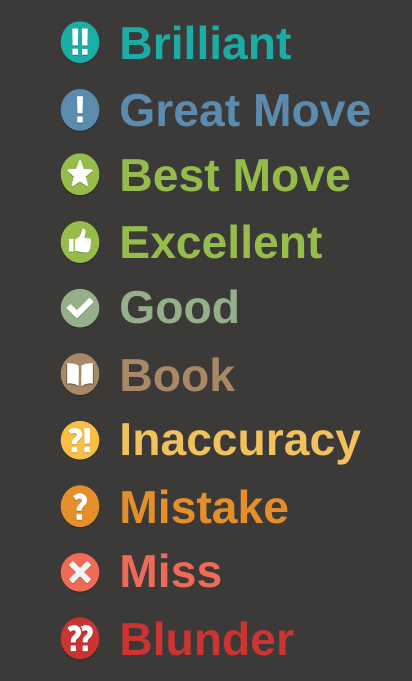
Le critère principal utilisé est la variation du pourcentage de victoire entre deux positions successives. Si un coup améliore nettement les chances de gain ou, au contraire, les fait chuter brutalement, il est classé en conséquence. Mais cette variation n’est pas analysée seule.
L’algorithme prend aussi en compte le type de pièce jouée, voire sacrifiée. Un sacrifice de dame, par exemple, n’aura pas le même impact qu’un simple échange de pions, même si la variation d’évaluation est identique. Cela permet de mieux refléter la valeur stratégique ou tactique du coup.
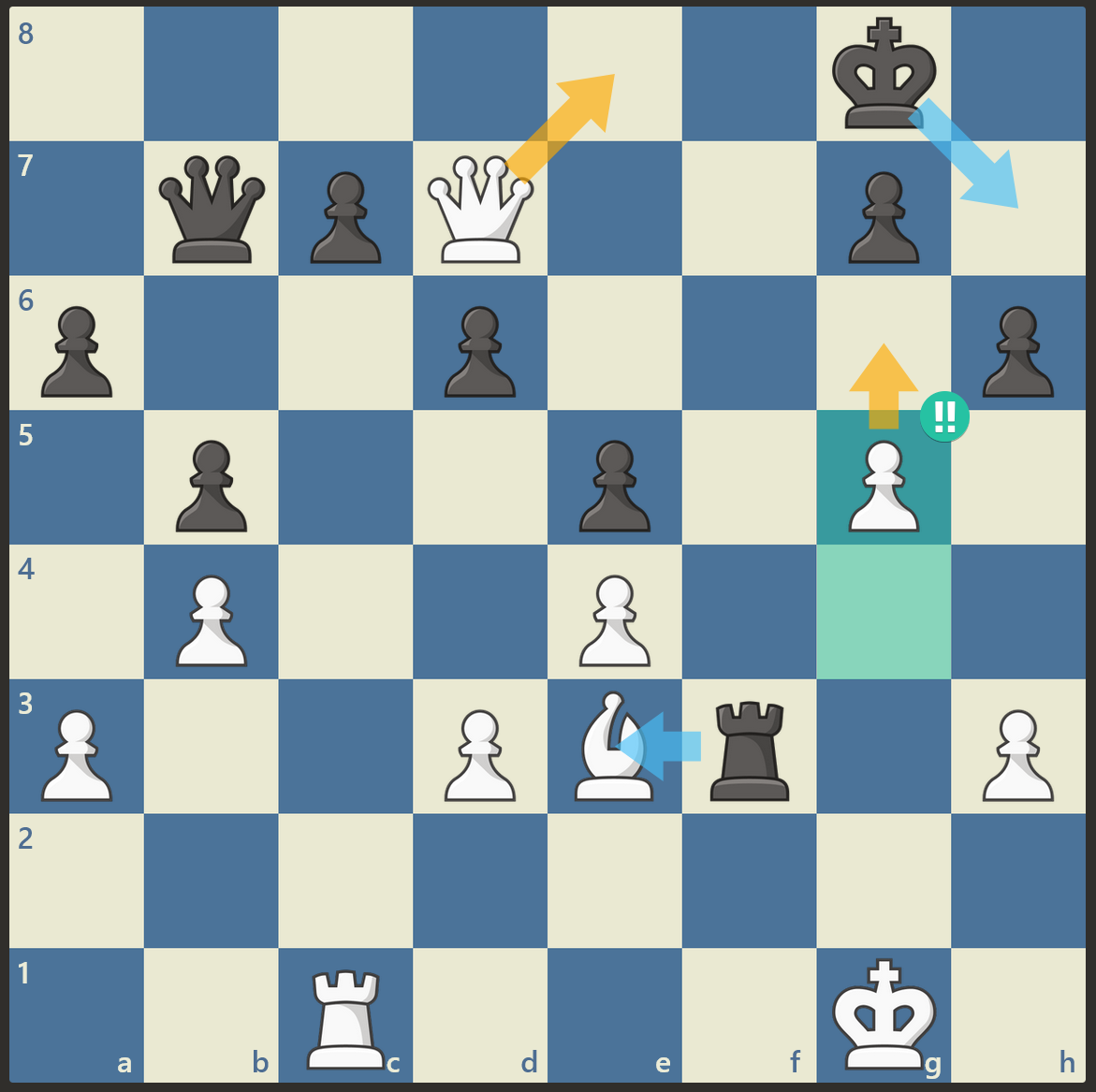
Ici par exemple, le coup est brillant parce que si l'adversaire prend mon fou (que j'ai donc sacrifié), je peux forcer l'échec et mat !
Le contexte du coup est également pris en compte : s’agit-il d’un coup forcé, d’un enchaînement logique, d’un mat imminent ou d’un retournement inattendu ? L’algorithme adapte dynamiquement ses seuils d’évaluation en fonction de la situation, grâce à une formule à seuils ajustables selon l’évaluation précédente.
Enfin, certains motifs spécifiques sont reconnus : des sacrifices brillants ou des mats manqués peuvent déclencher des classifications spéciales comme “Brilliant”, “Miss” ou “Forced”. Cela donne à l’analyse une dimension plus fine et plus humaine, au-delà des simples chiffres.
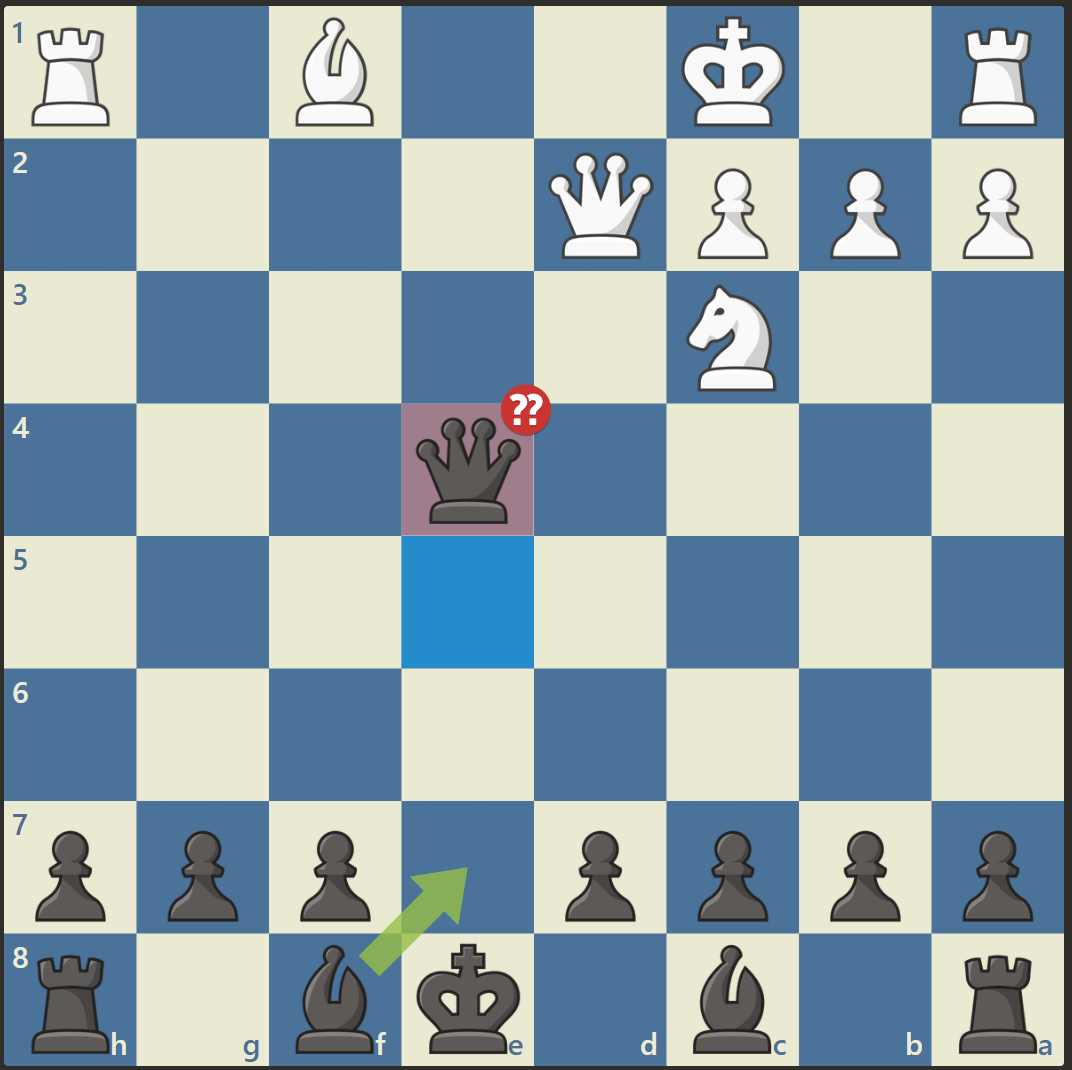
Ici, j'ai donné ma reine en 1 coup à cause du manque de temps, d'où la classification en 'Grosse Erreur'...
S'intégrer à l'interface de chess.com
L’interface utilisateur a été conçue pour s’intégrer naturellement à l’esthétique de Chess.com, sans perturber l’expérience de jeu. L’extension superpose les informations de manière subtile, mais lisible et immédiate. Les coups joués sont enrichis par un système de flèches colorées directement dessinées sur l’échiquier (similaire à celles du site original).
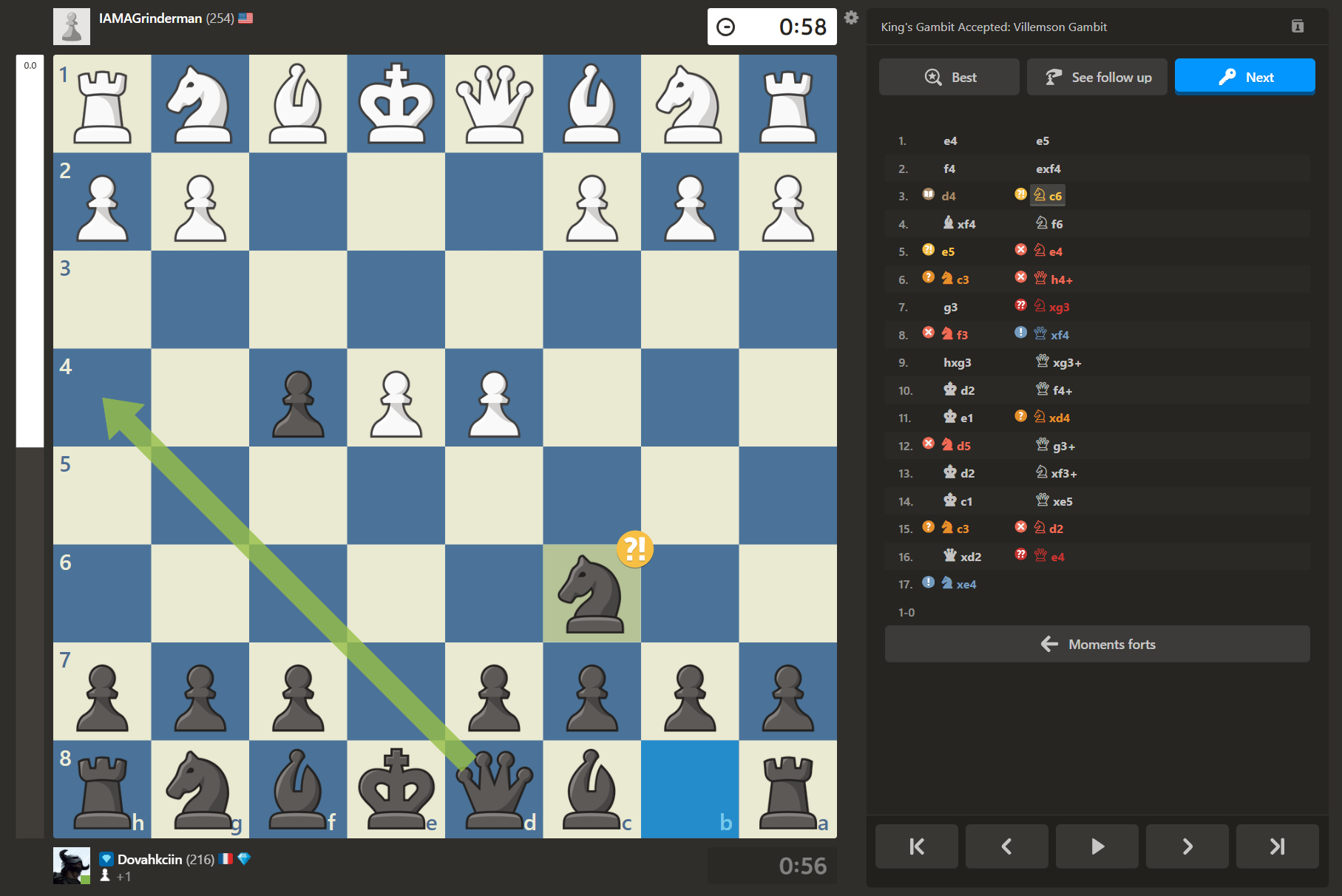
À cela s’ajoutent des icônes discrètes placées à côté des coups dans la notation, qui reprennent le style de Chess.com (étoiles, point d’exclamation, etc.) pour identifier rapidement les “Blunder”, “Best Move”, “Miss”, ou encore les coups brillants. L’objectif est de garder un rendu épuré, mais expressif : le joueur peut d’un coup d’œil visualiser l’impact de chaque décision sans quitter la partie des yeux.
Le style graphique est donc directement inspiré de l’UI de Chess.com, avec une volonté forte de rester dans leurs codes visuels, pour que l’extension semble presque native à la plateforme. Tout est pensé pour ne pas surcharger, mais enrichir l’interface.
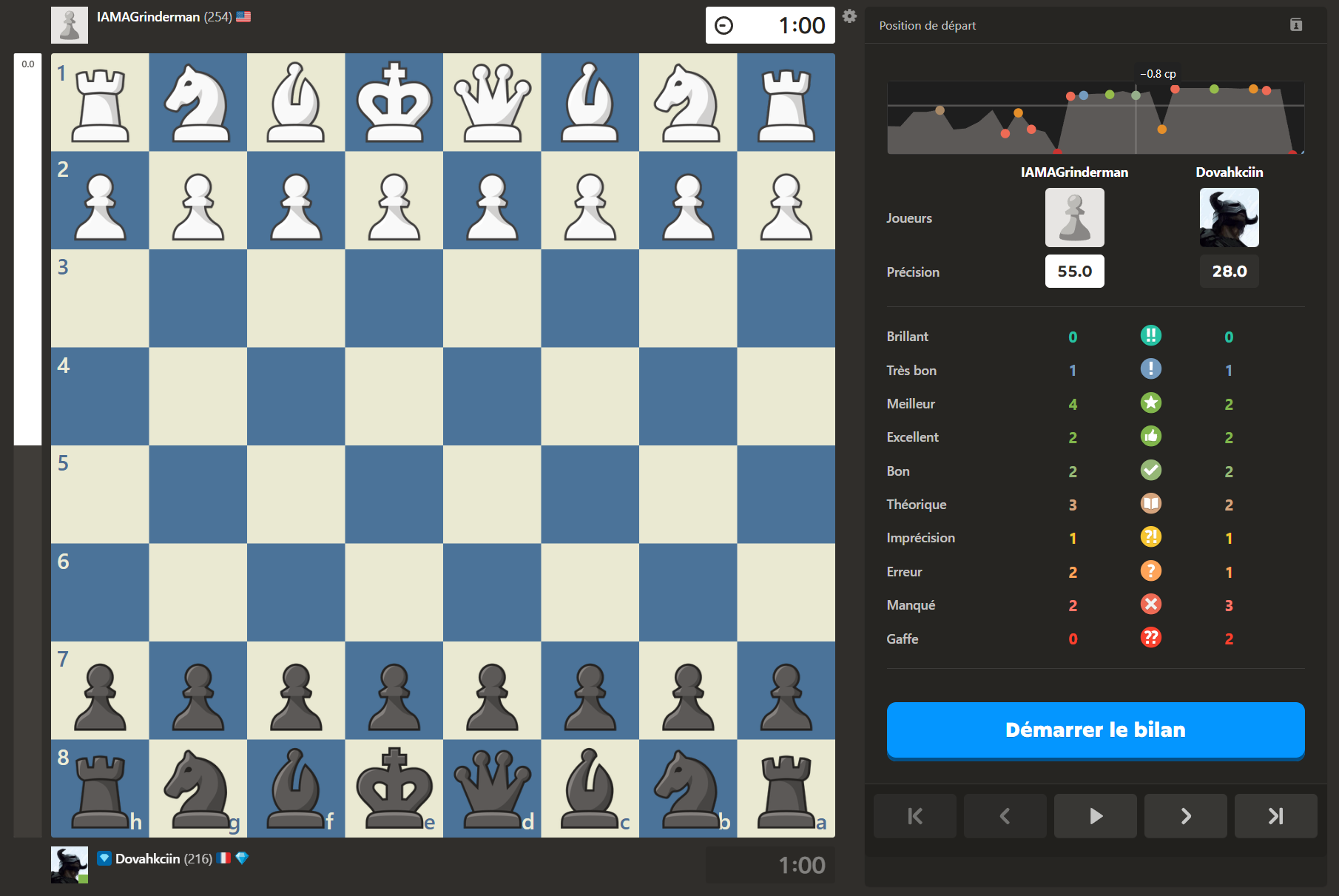
J'ai codé tout un sytème de graphique en svg afin d'afficher le 'momentum' de la partie et de visualiser qui gagne à quel momment dans la partie