Minimalist Color Picker
Une petite application faite en Rust pour sélectionner des couleurs partout sur son ordinateur.
Comme la plupart de mes projets récents sont sur des technos web, je passe beaucoup de temps à manipuler des palettes de couleurs. J’ai longtemps utilisé des extensions de navigateur, mais depuis ma migration vers Firefox, aucune ne me satisfaisait pleinement. Leur limitation majeure restait frustrante, car c'est impossible de 'sortir' du navigateur. Or, j'ai souvent besoin de récupérer des couleurs sur des images de mon ordinateur, ou quelque chose accessible facilement avec un raccourci clavier global.

C'est de ce constat que j'ai eu l'idée d'apprendre le Rust en développant ma propre solution desktop en un week-end.
Spoiler: j'ai pris plus qu'un week-end
Le choix de la stack : Tauri vs Electron
Fidèle à mon habitude d'expérimenter de nouvelles technologies, j'ai délaissé Electron, que j'avais déjà utilisé sur ZAMP, au profit de Tauri. C'est un framework qui m'intriguait depuis un moment car il promet le meilleur des deux mondes, en utilisant la flexibilité du web (HTML/CSS/JS) pour l'interface, et la puissance brute de Rust pour le backend natif.
Le résultat est sans appel. Là où une application Electron embarque un navigateur complet (Chromium) et pèse lourd, Tauri se contente d'utiliser la "webview" déjà présente sur le système d'exploitation. On obtient un binaire minuscule et une consommation mémoire ridicule, tout en gardant le confort de développement offert par React et Vite.

Comment capturer la couleur sous le curseur ? (c'est pas si simple)
Si récupérer la couleur sous le curseur semble trivial en théorie, la réalité technique est beaucoup plus compliqué. Il faut être capable de localiser le curseur à l'instant T, identifier sur quel écran il se trouve (dans une configuration multi-moniteurs), capturer la zone correspondante et extraire la valeur du pixel, le tout en quelques millisecondes pour que l'interface reste fluide.
Ma première approche consistait à capturer l'écran entier pour y lire un pixel. C'était une erreur, car en multi-écrans, la latence devenait perceptible. J'ai donc pivoté vers une stratégie plus ciblée en demandant à Rust de ne capturer qu'une minuscule zone autour du curseur, un carré de quelques dizaines de pixels seulement.
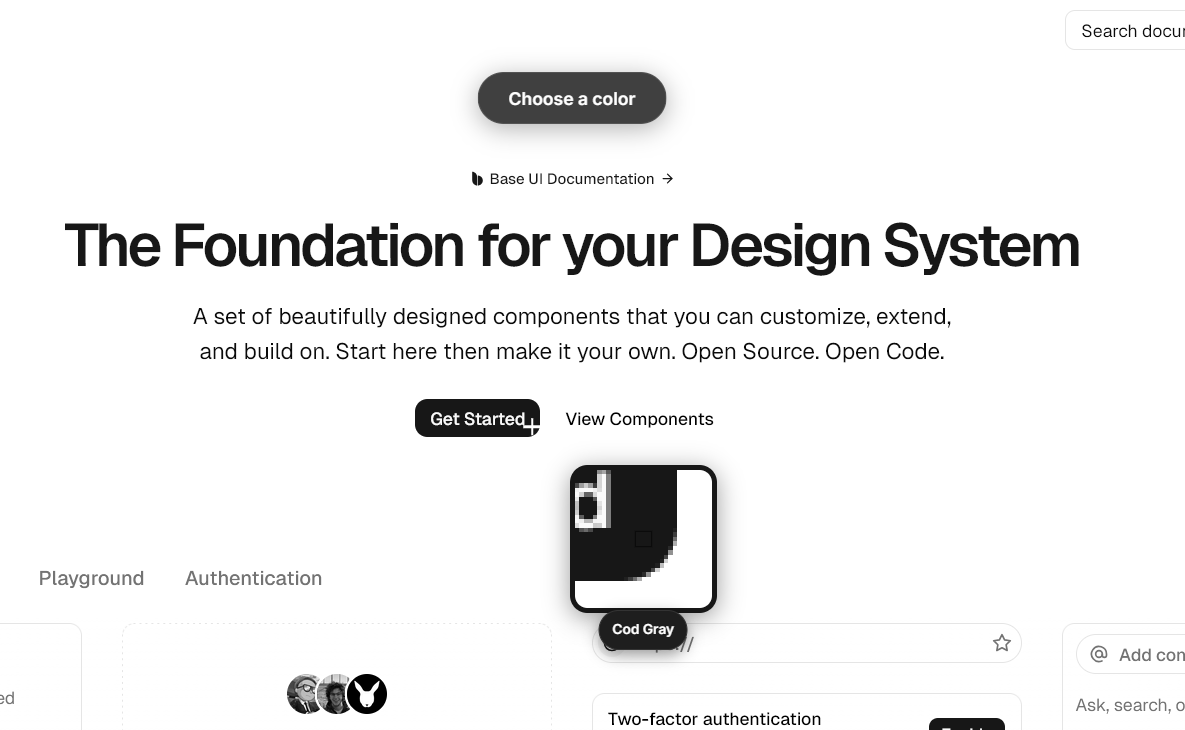
Cette optimisation a résolu deux problèmes d'un coup. D'une part, les performances sont devenues excellentes, et d'autre part, cette "zone tampon" m'a permis d'implémenter très facilement la loupe (magnifier). L'image que vous voyez dans l'interface n'est finalement qu'un zoom brut sur cette petite capture, ce qui rend la visée au pixel près beaucoup plus intuitive.
Un des défis de ce développement a aussi été la gestion des coordonnées sur Windows. Entre les écrans positionnés en coordonnées négatives et les différents facteurs de mise à l'échelle (DPI scaling, par exemple un écran à 100% à côté d'un autre à 150%) les calculs de position demandent une attention particulière. Heureusement, la communauté Rust est très active, et j'ai pu m'appuyer sur des crates existantes pour gérer ces subtilités.
Une expérience pensée pour le flux de travail
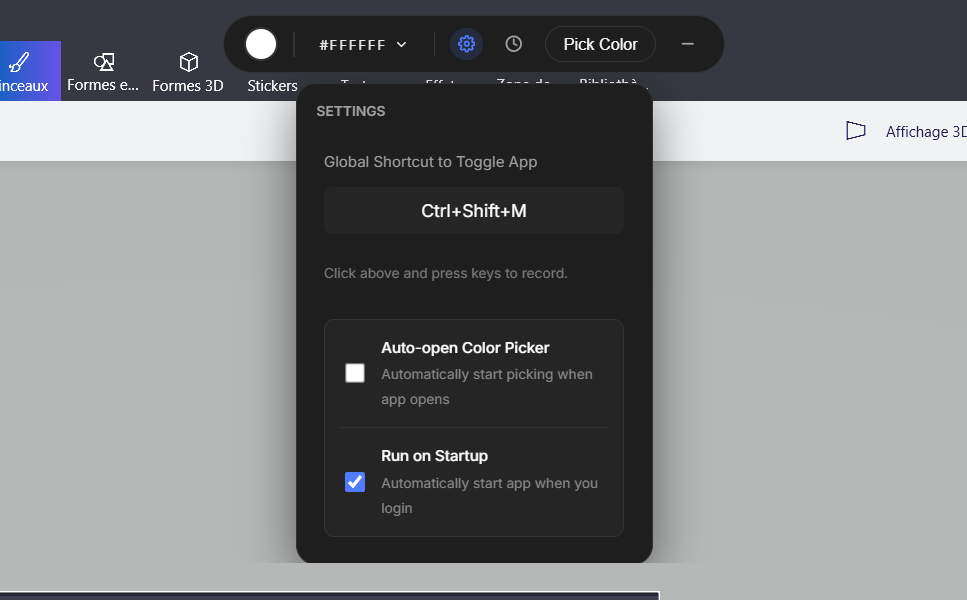
Je voulais un outil qui s'efface totalement quand je ne l'utilise pas. J'ai conçu l'application pour qu'elle vive dans la barre système (tray de Windows) et ne réponde que lorsque je l'invoque via un raccourci. L'idée est de pouvoir invoquer la pipette d'un simple Ctrl+Shift+C sans jamais avoir à chercher l'icône de l'application.
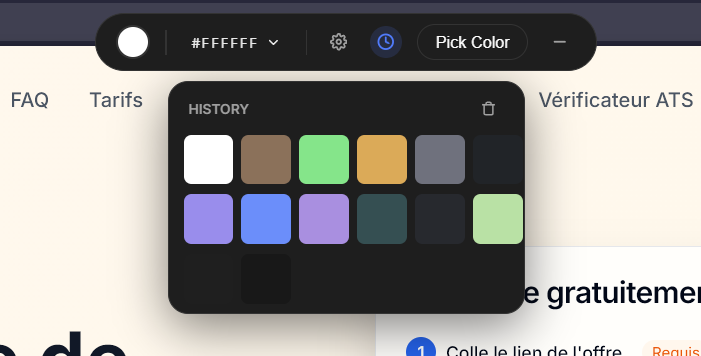
Une fois la couleur capturée, l'outil gère automatiquement ce que je trouvais pénible à faire manuellement. Il convertit la teinte dans les formats standards (HEX, RGB pour le CSS, HSL pour les ajustements) et la sauvegarde dans un historique local. Cela permet de revenir sur une couleur sélectionnée dix minutes plus tôt ou de comparer deux teintes sans avoir à refaire la manipulation.
Conclusion
Ce projet a été le prétexte idéal pour écrire mes premières lignes de Rust avec un objectif concret derrière. C'est un langage verbeux et exigeant, mais qui offre un sentiment de robustesse très satisfaisant une fois que le compilateur arrête de râler.
J'ai fais un color picker qui existait sans doute déjà, mais j'ai surtout compris comment Tauri fonctionne !